

[Date Prev][Date Next][Thread Prev][Thread Next][Date Index][Thread Index]
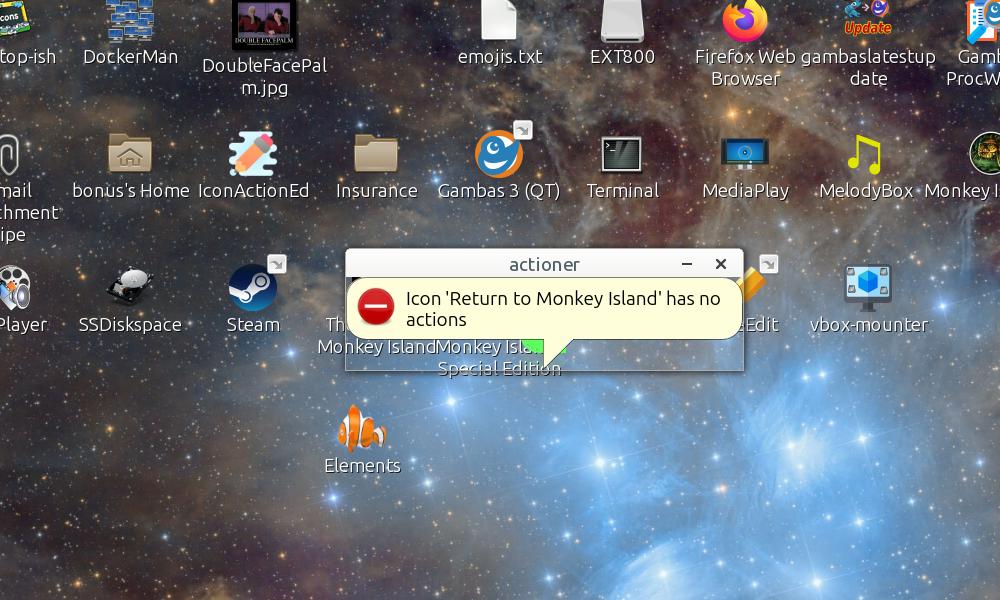
My Ballon() window has titlebar (Border)
[Thread Prev] | [Thread Next]
- Subject: My Ballon() window has titlebar (Border)
- From: Bruce Steers <bsteers4@xxxxxxxxx>
- Date: Tue, 6 Oct 2026 10:03:07 +0100
- To: Gambas Mailing List <user@xxxxxxxxxxxxxxxxxxxxxx>
Is it just my system or are any others finding Ballon() shows a window with
Border=True ?

I've worked out what it is.
It happens if the window is not open and it is borderless.

FBalloon.Run opens the window at line 55
If Not hWin.Modal ThenhWin.Show

If the above line is changed to this..
  If Not hWin.Modal Then
    hWin.Show
    Wait 0.1
  Endif

then the bug is gone.

Or if in my program i call

Me.Show
Wait 0.1
Balloon.Error(sMessage, Me)

But if i do not Show the form first (with Wait 0.1) and just leave it to
FBalloon.class to Show it or do not use Wait 0.1 my Balloon has a Border
(as can be seen in the pic)


Some simple tests on the shell..

echo -e 'use "gb.gui"
use "gb.form"
Dim f as Form=New Form
f.Resize(100,100)
Balloon("This is a message",f)
wait 3
f.Close' | gbs3 -
On my system the above show no balloon at all

echo -e 'use "gb.gui"
use "gb.form"
Dim f as Form=New Form
f.Resize(100,100)
f.Show
Balloon("This is a message",f)
wait 3
f.Close' | gbs3 -
That also shows no Balloon  (I added f.Show)

echo -e 'use "gb.gui"
use "gb.form"
Dim f as Form=New Form
f.Resize(100,100)
f.Border = False
f.Show
Balloon("This is a message",f)
wait 3
f.Close' | gbs3 -
Using Border = False on the form now DOES make the Balloon show but it has
a Border/TitleBar.
If i remove f.Show then the exact same thing happens.

The following works (I added Wait 0.1 after f.Show)
It works as expected if i use a border on the Form or not..

echo -e 'use "gb.gui"
use "gb.form"
Dim f as Form=New Form
f.Resize(100,100)
f.Border = False
f.Show
Wait 0.1
Balloon("This is a message",f)
wait 3
f.Close' | gbs3 -

Bizzarre
BruceS
Attachment:
Untitled.jpg
Description: JPEG image
| Re: My Ballon() window has titlebar (Border) | Lee <t.lee.davidson@xxxxxxxxx> |