

[Date Prev][Date Next][Thread Prev][Thread Next][Date Index][Thread Index]
Re: Wayland again
[Thread Prev] | [Thread Next]
- Subject: Re: Wayland again
- From: valaquarus <valaquarus@xxxxxxxxx>
- Date: Sun, 08 Nov 2026 10:55:26 +0100
- To: user@xxxxxxxxxxxxxxxxxxxxxx
Le dimanche 08 novembre 2026 à 08:27 +0000, Bruce Steers a écrit :
> As usual you must post a project that produces the bug.
>
> It's possibly a code error.
>
> This is not correct...
> If XInitThreads() == 0
>
> == Is for string comparison not integer values and will not be
> working as you expect.
>
> It's probably not why your code is failing though so post a sample
> project so we can see what else is happening to cause the problem.
>
> The IDE creates many DrawingArea objects and that works without
> crashing yes?
>
> So it's not simply creating a DrawingArea in Wayland that's an issue.
> It must be something else.
>
>
> Respects
> BruceS
>
> On Sun, 8 Nov 2026, 07:56 valaquarus, <valaquarus@xxxxxxxxx> wrote:
> > Howdy everyone,
> > I just tested several of my programs in wayland, just to see.
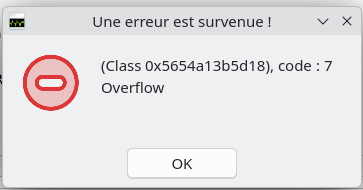
> > Several do not even start with an error I dont understand :
> >
> >
> > It just stop in the first steps, here :
> >
> > Public Sub _new()
> >
> > $hDrawingArea = New DrawingArea(Me) As "player" '<-----------------
> > ---' this declaration seems to not fit wayland
> > $hDrawingArea.Cached = True '<---------------------------------
> > -------------------' for that, this is false
> > If XInitThreads() == 0 Then Error.Raise(("Quelque chose ne va
> > pas!"))
> > $inst = libvlc_new(0, Null)
> > $id = $hDrawingArea.Id '<-----------------------------------------
> > ------------------' for that, this is false

the error occurs in the last sentence $id = $hDrawingArea.Id when I do
a step by step
| Wayland again | valaquarus <valaquarus@xxxxxxxxx> |
| Re: Wayland again | Bruce Steers <bsteers4@xxxxxxxxx> |