

[Date Prev][Date Next][Thread Prev][Thread Next][Date Index][Thread Index]
Re: Watching a variable (array) for change
[Thread Prev] | [Thread Next]
[Date Prev] | [Date Next]
- Subject: Re: Watching a variable (array) for change
- From: Bruce Steers <bsteers4@xxxxxxxxx>
- Date: Thu, 29 Oct 2026 15:38:16 +0000
- To: user@xxxxxxxxxxxxxxxxxxxxxx
On Thu, 29 Oct 2026 at 12:38, Lee <t.lee.davidson@xxxxxxxxx> wrote:

> On 10/29/26 5:01 AM, Benoît Minisini wrote:
> > Le 25/10/2026 à 21:51, Bruce Steers a écrit :
> >>
> >> Is is possible to watch a variable for changes?
> >>
> >
> > The debugger can do that.
> That's what I was thinking. If I recall correctly, there used to be a tab
> at the bottom of the text edit area, along with
> "Console", that allowed for adding watch expressions. It is no longer
> there on my system.
>
> There is a "Watch expression" icon that shows up at the top of the text
> edit area when a program is running. But, clicking on it
> does nothing even if a breakpoint has been reached.
>
>
> --
> Lee


Well that's all well and lovely for the debugger but I want to do it !!!  ;)

Shall i assume there is definitely no "easy" way to do it?

I had set up a timer that checked the Count every couple of seconds but
I've now imported the full gb.form.editor into my project again as I have
too mane tweaks that i cannot do via inheritance
I've set up a Form that imports it from master and applies my tweaks.

But as a curiosity,, could the debugger do it for me in a normal running
program by running along side it or something?, and would it be cpu greedy?

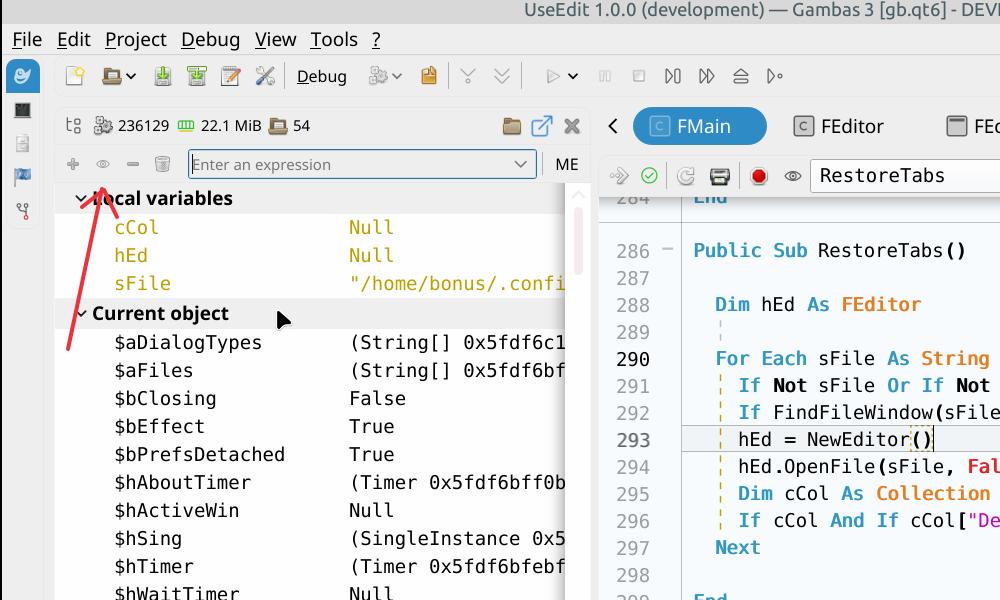
As for watching an expression i see the controls (see pic) but no matter
what i click all the items remain disabled.

Respects
BruceS
Attachment:
Untitled.jpg
Description: JPEG image
| Watching a variable (array) for change | Bruce Steers <bsteers4@xxxxxxxxx> |
| Re: Watching a variable (array) for change | Benoît Minisini <benoit.minisini@xxxxxxxxxxxxxxxx> |
| Re: Watching a variable (array) for change | Lee <t.lee.davidson@xxxxxxxxx> |