

[Date Prev][Date Next][Thread Prev][Thread Next][Date Index][Thread Index]
Re: WebView object - Event on Link click
[Thread Prev] | [Thread Next]
- Subject: Re: WebView object - Event on Link click
- From: gbWilly <gbWilly@xxxxxxxxxxxxxx>
- Date: Thu, 10 Sep 2026 18:59:13 +0000
- To: Benoît Minisini <benoit.minisini@xxxxxxxxxxxxxxxx>
- Cc: user@xxxxxxxxxxxxxxxxxxxxxx
On Thursday, September 10th, 2026 at 09:39, Benoît Minisini <benoit.minisini@xxxxxxxxxxxxxxxx> wrote:

> Le 09/09/2026 à 18:58, Bruce Steers a écrit :
> > Sorry i did not think at the time but using MouseUp is not so good,
> > because it will trigger when clicked anywhere on the page, there is no
> > way to tell if you are still hovered over the link or not.
> >
> > So I guess Benoits advice would be the best. using the Start() event to
> > intercept the page load.
> >
> >
> > I guess my addition to the wiki is not correct then
> >
> > So i know what to add can you please explain...
> > When exactly does Url fire?
> > When exactly does Start Fire?
> >
> > Thanks
> > BruceS
> >
>
> I have updated the documentation of WebView on the wiki.
>

Happy with any addition as I struggle with this component. Thank you.

I used to use qtwebkit (deprecated) and knew how to manage that what I needed. It offered a lot more possibilities.

Most I have discovered with trial and error and adding lines of Debug "event name" to each event to see what happens when simply to figure things out.

Personally I think webview is a digression compared to qtwebkit, with very little options other that seemingly learning java to get the real deal, which I'm not interested in.

But, it might also just be that I don't understand how to use the tool properly, which is hard if you need to rely on trial and error and takes ages...

So, any additions are very welcomed. I'm actively using this as viewer for the learning guides and I manage because I control all input, as it's all local html files.

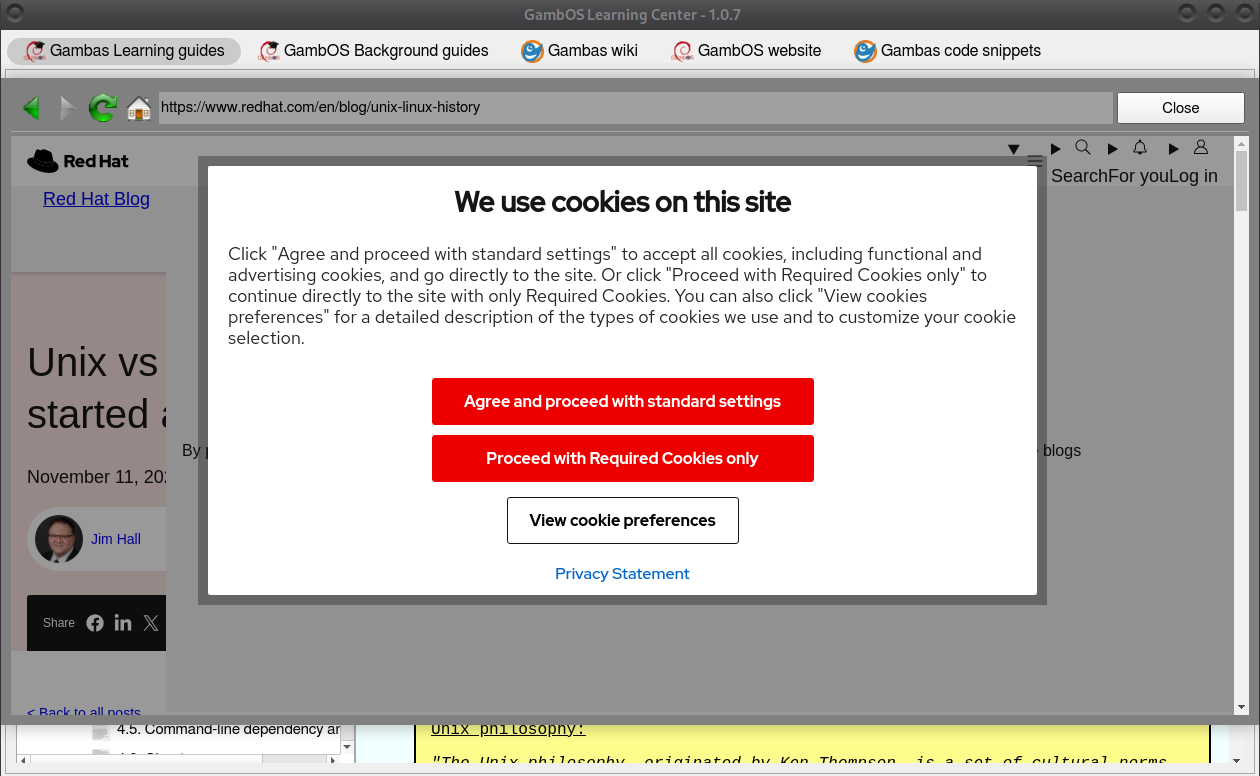
But, to show online references, I struggle at parts, like a cookie accept/reject situation for example that occurred recently (see attached screenshot). It does nothing when clicking on one of both choices. If I don't find a solution it won't become a reference will be the final solution.

gbWilly
Attachment:
1.png
Description: PNG image
| Re: WebView object - Event on Link click | Denis Crowther <denisc@xxxxxxxxxxxxxx> |
| Re: WebView object - Event on Link click | Lee <t.lee.davidson@xxxxxxxxx> |
| WebView object - Event on Link click | Olivier Cruilles <olivier.cruilles@xxxxxxxx> |
| Re: WebView object - Event on Link click | gbWilly <gbWilly@xxxxxxxxxxxxxx> |
| Re: WebView object - Event on Link click | Bruce Steers <bsteers4@xxxxxxxxx> |
| Re: WebView object - Event on Link click | Olivier Cruilles <olivier.cruilles@xxxxxxxx> |
| Re: WebView object - Event on Link click | Bruce Steers <bsteers4@xxxxxxxxx> |
| Re: WebView object - Event on Link click | Benoît Minisini <benoit.minisini@xxxxxxxxxxxxxxxx> |