

[Date Prev][Date Next][Thread Prev][Thread Next][Date Index][Thread Index]
Re: ValueBox issue
[Thread Prev] | [Thread Next]
- Subject: Re: ValueBox issue
- From: Bruce Steers <bsteers4@xxxxxxxxx>
- Date: Sat, 15 Aug 2026 18:35:33 +0100
- To: user@xxxxxxxxxxxxxxxxxxxxxx
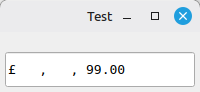
I think it's design is to attempt to be the same size regardless of the
value.

I guess it would look better (and make more sense) amongst a row of
ValueBox's all showing different values.

Maybe a property could be added to ValueBox to hide superfluous thousand
separators for those who want that?

Respects
BruceS


On Sat, 15 Aug 2026 at 17:31, Charlie Ogier <charlie@xxxxxxxxxx> wrote:

> The ValueBox does not crash any more, thanks!
>
> It is not a major issue but the display is not correct using the code
> below.
>
> ' Gambas class file
>
> Private ValueBox1 As ValueBox
>
> Public Sub Form_Open()
>
>   With Me
>     .Arrangement = Arrange.Vertical
>     .Padding = 5
>     .H = 60
>     .W = 200
>   End With
>
>   With ValueBox1 = New ValueBox(Me) As "ValueBox1"
>     .H = 35
>     .Type = ValueBox.Currency
>     .Text = "99.00"
>   End With
>
> End
>
>
>
> Charlie
>
> On 14/08/2026 05:46, Benoît Minisini wrote:
>
> Le 08/08/2026 à 16:29, Charlie Ogier a écrit :
>
> Hi,
>
> I am having an issue with ValueBox when used for currency, extra commas
> appear and the contents are returned as NULL . Is this me or is it a bug?
>
> Thanks,
>
> Charlie
>
>
> The bug should have been fixed in commit
> https://gitlab.com/gambas/gambas/-/commit/3ceffffef4f6c2e4ddf74841dcab278d1f7a6208
> .
>
> Regards,
>
>
>
| Re: ValueBox issue | Claus Dietrich <claus.dietrich@xxxxxxxxxx> |
| ValueBox issue | Charlie Ogier <charlie@xxxxxxxxxx> |
| Re: ValueBox issue | Benoît Minisini <benoit.minisini@xxxxxxxxxxxxxxxx> |
| Re: ValueBox issue | Charlie Ogier <charlie@xxxxxxxxxx> |