

[Date Prev][Date Next][Thread Prev][Thread Next][Date Index][Thread Index]
Re: Background and theme files for gb.highlight
[Thread Prev] | [Thread Next]
- Subject: Re: Background and theme files for gb.highlight
- From: gbWilly <gbWilly@xxxxxxxxxxxxxx>
- Date: Thu, 02 Apr 2026 15:58:51 +0000
- To: Gambas Mailing List <user@xxxxxxxxxxxxxxxxxxxxxx>
On Thursday, April 2nd, 2026 at 13:21, Benoît Minisini <benoit.minisini@xxxxxxxxxxxxxxxx> wrote:

> Le 02/04/2026 à 12:55, gbWilly a écrit :
> > It came to my attention that Background in a themes file is no longer
> > applied to my TextEditor control in Gambas 3.21.5
> > This really sucks big time. The application is build in 3.19.6 and runs
> > fine there shows all as I like and want it.
> >
>  > [...]
>
> The reason of the change is the new syntax highlighting system.
>
> There are three points that must be taken into account:
>
> 1) The TextHighlighterTheme class has now an explicit 'Background'
> property, that is filled by the "Background" entry of the theme file if
> it exists.
>
> 2) The TextHighlighterTheme adapts automatically to a dark background
> unless its 'Adaptive' property is set to FALSE (the old behaviour).
>
> 3) The background color of the TextEditor control is now prioritary, and
> is applied to the theme when the Theme property is set, so that the
> theme can adapt to that background color.
>
> So, to get the old behaviour, you should:
>
> - Set the Adaptative property of the theme to FALSE.
> - Save the Background color property of the theme.
> - Assign the theme to the editor.
> - Apply the saved background color to the editor Background property.
>
> If you just apply the theme to the editor, you get the new behaviour:
> the theme is automatically adapted to the background color of the
> editor, which is by default the background color chosen by the user for
> its desktop interface.
>
> Sorry for the inconvenience, and tell me if it works for you.
>

I had to investigate to explain it on gambas.one in the relevant topic where I also relayed your answer.
Good if people are aware of changes.

So, I tried your suggestion:

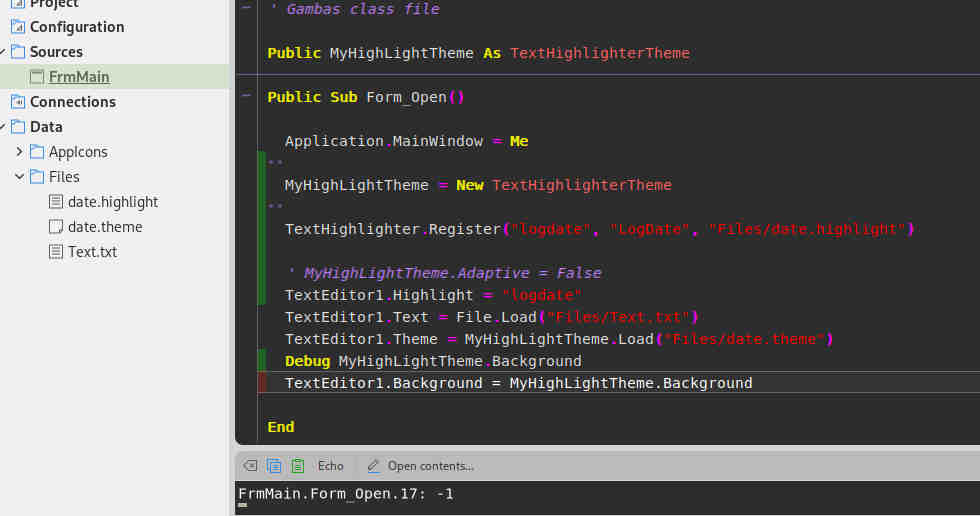
To start with: There is no TextHighlighterTheme Adaptive property in 3.21, so there goes the 3.21 series as possible future candidate to migrate to. I guess all the rest is as you explained or did I miss something (see screenshot).

Anyway, the TextHighlighterTheme Background returns -1 after loading from the theme file where it happens to be set to black, so it doesn't take the actual background color from the theme file as you claim (or is that what Adaptive = False has to take care off?).

Would it not be easier to just set the TextHighlighterTheme Background to the actual background color found in the theme file and apply that? It seems that is easily achieved if a Background is already read from a theme file. And if no background is provided in the theme file, use the new behavior, then it is all good in all cases, past and present, and backward compatible is ensured. To me it seems the obvious solution, but then I have no clue of what is going on 'behind the scene' and what the 'motivation' for the new behavior is.

Funny thing is, I once decided to migrate all my development (work and private) to 3.19.6 (at that time I was testing to migrate to 3.18.4.) just because of gb.highlight, as I had some new development that needed highlighting and I didn't want to create them in gb.eval.highlight to later have extra work migrating past 3.18.4. Seems I'll have that extra work anyway once I migrate away from 3.19.6 (and apparently past 3.21 as well) :-/

What is the actual goal of the new behavior? It worked fine before, I never had any issues.
Was there something not to your liking in the old behavior?

Anyway, thank you for your work.
I'll adapt somehow, someday when time comes.

gbWilly

P.S. I noticed in my previous post with screens that the nicely rounded tabs on 3.19.6 turn into these ugly squared ones on 3.21.5.
Are you doing some graphical overhaul of it all, or what is happening there?
Attachment:
20260402-174009.jpg
Description: JPEG image
| Re: Background and theme files for gb.highlight | Bruce Steers <bsteers4@xxxxxxxxx> |
| Background and theme files for gb.highlight | gbWilly <gbWilly@xxxxxxxxxxxxxx> |
| Re: Background and theme files for gb.highlight | Benoît Minisini <benoit.minisini@xxxxxxxxxxxxxxxx> |