

[Date Prev][Date Next][Thread Prev][Thread Next][Date Index][Thread Index]
Re: Selection in the IDE's code window
[Thread Prev] | [Thread Next]
- Subject: Re: Selection in the IDE's code window
- From: CD <dessere.claude@xxxxxx>
- Date: Thu, 12 Feb 2026 19:30:46 +0100
- To: user@xxxxxxxxxxxxxxxxxxxxxx
Le mercredi 11 février 2026 à 20:14 +0100, Benoît Minisini a écrit :
> Le 11/02/2026 à 19:35, CD a écrit :
> >
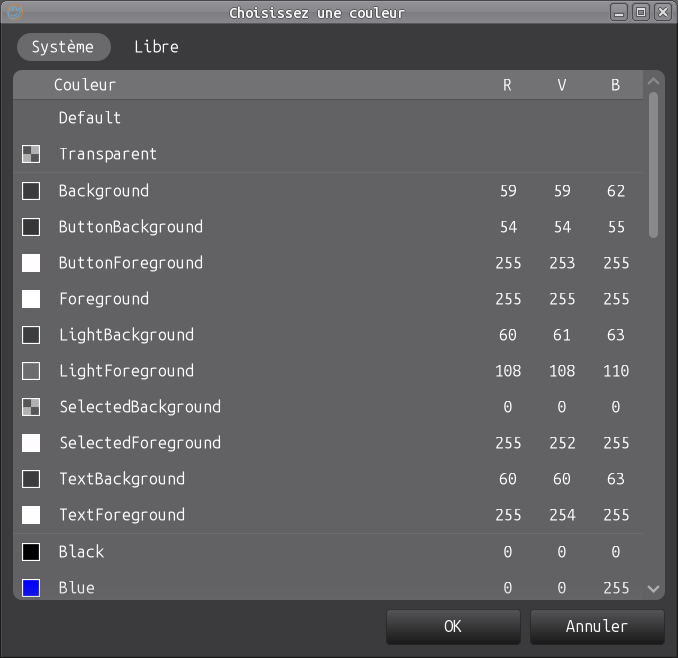
> > > Can you send a screenshot of the first tab of the IDE color selection
> > > dialog?
> > If you mean the first tab of Tools/Preferences: attachment
> >
> >
> > > Can you try to run the IDE with QT?
> > you mean Debogage/Configuration/Environnement GB_GUI = qt5 ?
>
> No, I meant what I wrote: the first tab of the IDE color selection
> dialog, when you choose a color for a control for example.
>
> >
> >
> > > Thanks in advance for the answers.
> > It's me who should be thanking you for your help.
> >   I'm completely lost and confused, especially in the code editor window.
> > Perhaps I can manually modify the value of `SelectedBackground` in the
> > GTK unparsable configuration file, but where ???
> >
>
> That's the problem. You can help by sending a compressed zip of your
> widget theme directory. The css file that normally colors the different
> widgets is normally included in it.
>
> Regards,
>
Here is Benoît, the theme that has been causing problems since 06/02/2026 and
the SelectColor IDE screenshot

Regards
Attachment:
ColorSelection.png
Description: PNG image
Attachment:
BlackMATE.tar.bz2
Description: application/bzip2-compressed-tar