

[Date Prev][Date Next][Thread Prev][Thread Next][Date Index][Thread Index]
Re: MediaView
[Thread Prev] | [Thread Next]
- Subject: Re: MediaView
- From: Bruce Steers <bsteers4@xxxxxxxxx>
- Date: Wed, 21 Jan 2026 18:01:29 +0000
- To: user@xxxxxxxxxxxxxxxxxxxxxx
On Wed, 21 Jan 2026 at 17:12, Johny Provoost <johny.provoost@xxxxxxxxx>
wrote:

> Hallo,
>
> Is it possible to change the colour of the progress bar and the text
> colour of MediaView?
> I tried change the background and the foreground colours but nothing
> changed.
>
> Working with Gambas 3.21.2 on Mint 21.1 Cinnamon.
> --
>
>
>
> *Vriendelijke Groeten*
>
> *Johny Provoost*
>
> *mailto: johny.provoost@xxxxxxxxx <johny.provoost@xxxxxxxxx>*
>
> *mailto: johny.provoost@xxxxxxxx <johny.provoost@xxxxxxxxx>*
>


Hi you can navigate manually through it's children to get the part you want.
you can hack your way into a lot of gambas controls and do things they were
not designed to do.

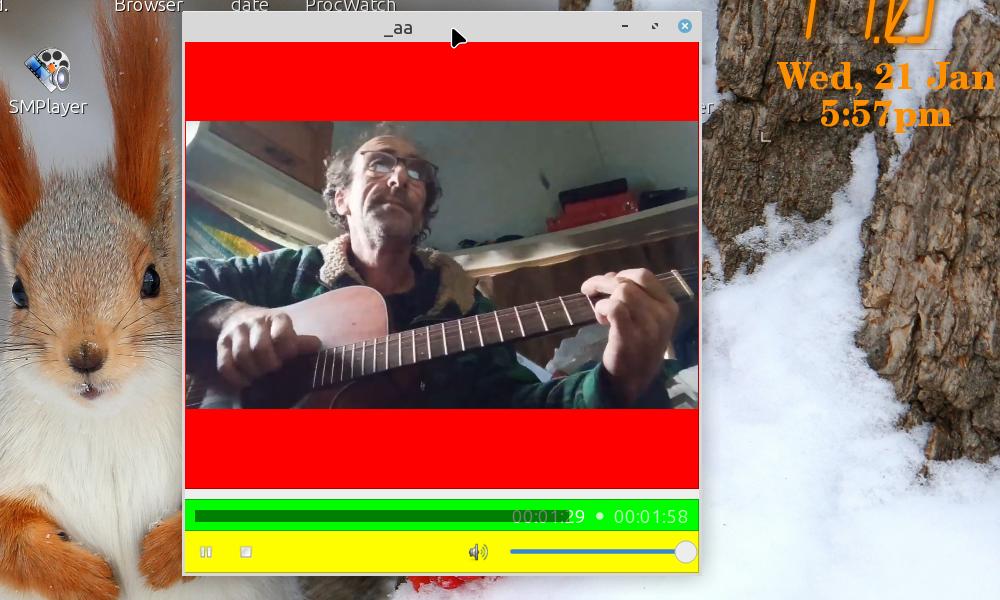
He is an example i just made that lets you set background for either video,
time or control zones
for example to change the color of the time slider to red use this..

The program below gives a MediaView like the attached picture.

ChangeMediaViewColor(MediaView1, "time", Color.Red)

-----------------
Public Sub Form_Open()

  ChangeMediaViewColor(MediaView1, "video", Color.Red)
  ChangeMediaViewColor(MediaView1, "time", Color.Green)
  ChangeMediaViewColor(MediaView1, "control", Color.Yellow)

End

'' Change Background of a "zone" , zone can be video (video screen), time
(position slider) or control (control panel)
Public Sub ChangeMediaViewColor(View As MediaView, Zone As String,
Background As Integer)

  Dim aZone As String[] = ["video", "", "time", "control"]
  Dim iZone As Integer

  iZone = aZone.Find(Zone, gb.IgnoreCase)
  If Not Zone Or If iZone = -1 Then Error.Raise("bad zone")

  Dim o As Object = View.Children[0]

  o = o.Children[0]
  o = o.Children[iZone]
  o.Background = Background
  If o.Name = "panVideo" Then  ' also set the drawingarea inside this panel
    o = o.Children[0]
    o.Background = Background
  Endif

End

-----------------

Hope that helps.
BruceS
Attachment:
Untitled.jpg
Description: JPEG image
| Re: MediaView | Johny Provoost <johny.provoost@xxxxxxxxx> |
| MediaView | Johny Provoost <johny.provoost@xxxxxxxxx> |